Postado Março 15Mar 15 I'm trying to run Game.exe, and I got this issue. Has anyone encountered this before? How can I resolve it?
Postado Março 15Mar 15 1 minuto atrás, Piegab disse:I'm trying to run Game.exe, and I got this issue. Has anyone encountered this before? How can I resolve it?The game.ini or setthings file is missing from the clientfull folder.
Postado Março 15Mar 15 Solução Agora, Manezinho disse:The game.ini or setthings file is missing from the clientfull folder.2 minutos atrás, Piegab disse:I'm trying to run Game.exe, and I got this issue. Has anyone encountered this before? How can I resolve it?game.ini Editado Março 15Mar 15 por Manezinho
Postado Março 15Mar 15 Autor Just now, Manezinho said:The game.ini or setthings file is missing from the clientfull folder.I have the game.ini and settings.ini but unfortunately, the content is incorrect. can you attach the game.ini as .rar? thank you
Postado Março 15Mar 15 Autor 2 hours ago, Piegab said:I have the game.ini and settings.ini but unfortunately, the content is incorrect. can you attach the game.ini as .rar? thank youafter adding the game.ini, it loads but I can see all white
Postado Março 15Mar 15 8 horas atrás, Piegab disse:after adding the game.ini, it loads but I can see all white The Game folder in your full client is incompatible. Editado Março 15Mar 15 por Manezinho
Postado Março 17Mar 17 9 horas atrás, Piegab disse:Note This thread has been successfully resolvedPlease indicate the solution so that other people can help
Postado Março 17Mar 17 Autor On 3/15/2026 at 9:58 AM, Manezinho said:game.ini1 hour ago, PoTrAs18 said:Please indicate the solution so that other people can help@Manezinho Thank you for sharing the game.ini file—it completely resolved my issue.
Postado Março 17Mar 17 3 horas atrás, Piegab disse:@Manezinho Thank you for sharing the game.ini file—it completely resolved my issue.Hey my friend, no problem, I'm just helping people out. If you could, give my profile a like and follow me. Thanks!

I'm trying to run
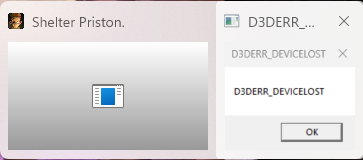
Game.exe, and I got this issue. Has anyone encountered this before? How can I resolve it?