
Alucard
Doador
-
Registro em
-
Última visita
-
 caospk.com.br
 -
.
-
me desculpa, fui mlk
-
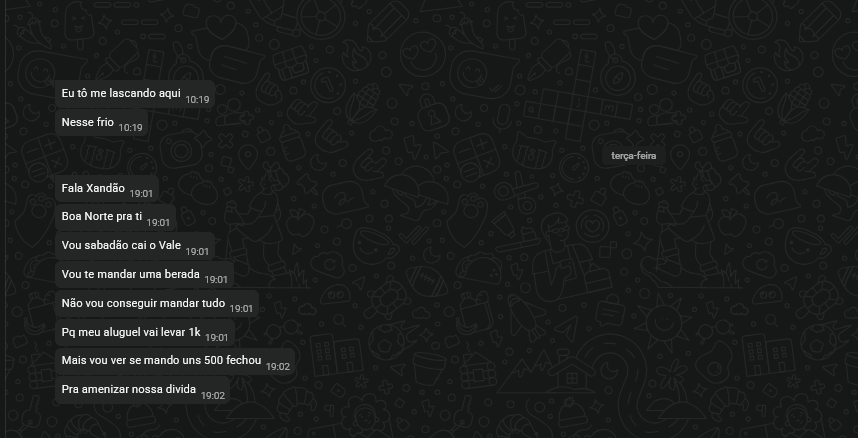
Venho através deste poste alertar sobre um calote que levei , sei que projeto de arquivos não se faz "fiado" parcelado em determinadas vezes. Vendi para ele um trabalho , por 6x600 +1 de 800, (nenhuma foi paga). farmou os donatinhos brilhosos, e nada para o dev, mas tá bom o que é retirado depois é recompensado. Só estou alertando mesmo para não serem otário igual eu fui. Cada dia é uma conversa triste, mas nunca vai pagar porque sabemos. [FICA O ALERTA]
-
kkkkkkkkkkkkkkkkkkkkkkkkkkkkkkkkkkkkkkkkkkkkkkkkkkkkkkkkkkkkkkkkkkkkkkkkkkkkkkkkkkkkkkkkkkkkkkkkkkkkkkkkkkkkkkkkkkkkkkkkkkkkkkkkkkk muito bom
-
quero ver fazer a dancinha do ragatanga AKAKKAKAKAK muito loco
-
kkkkkkkkkkkkkkkkkkkkkkkkkkkkkkkkkkkkkkkkkkkkkkkkkkkkkkk ri mas concordei.
-
é mas tem nego que deixa hardcoded .
-
tem um sistema ai, da uma procurada que voce simula jogadores, e da pra tu ter uma base
-
show!
-
confere indo neste fazendo favor. path-alu.rar
então estou no pc aqui, o dono do server e o gm está logado normal com mesmos arquivos que o seu e o meu.
não chegou nem o ticket no servidor de validação. precisa estar tudo fechado.
o cerberus chega abrir, fica carregando laranja e nao vai para o verde, para no vermelho?